by learnformula
search
For Business
Team license & compliance management
For Higher Education
Academic partnerships
For Government Agencies
Government training solutions
For Instructors & Course Creators
Teach on our marketplace
Become a Sponsor
Reach 9M+ professionals
Log inStart 7-Day Free TrialStart Free TrialStart Free Trial
search
Courses/Office Productivity/Data Analysis & Visualization

Build a Descriptive Analytical Dashboard in Power BI

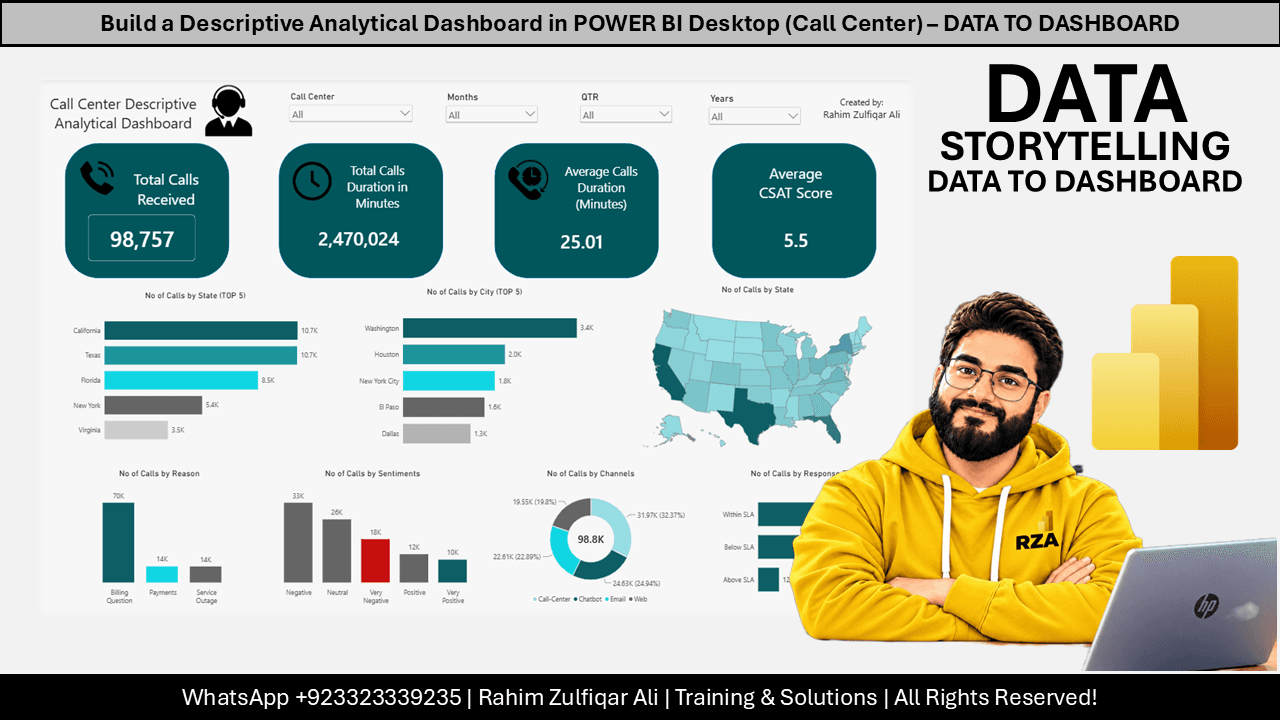
Master automated data workflows and professional visualization techniques to turn raw Excel files into actionable business insights.
Created byRahim Zulfiqar Ali
BeginnerUpdated Oct 17, 2026
Build a Descriptive Analytical Dashboard in Power BI

What You'll Learn

check_circleApply Power Query to automate the ingestion and transformation of multiple Excel files
check_circleConstruct a relational data model using fact and dimension tables
check_circleImplement interactive slicers and filters to enable dynamic data exploration
check_circleDesign professional dashboard layouts using custom shapes, images, and KPI cards
check_circleExecute chronological sorting for time-based data using custom tables and relationships

About This Course

This course provides a comprehensive guide to building a descriptive analytical dashboard using Microsoft Power BI Desktop. It covers the end-to-end process of importing multiple Excel workbooks from a folder, performing data transformations using Power Query, and establishing automated workflows for future data updates. The material details how to create a data model, implement relationships between fact and dimension tables, and design a professional dashboard interface with interactive slicers and KPIs. Learners will also explore techniques for data visualization, including the use of shapes, images, and various chart types to effectively communicate business metrics like call center performance.

Topics Covered:

  • Power BI data import and folder connectivity
  • Power Query ETL and data transformation workflows
  • M language code for data automation
  • Data modeling and relationship management
  • Implicit vs explicit measure calculation
  • Interactive slicer and filter implementation
  • Dashboard visualization and layout design
  • Fiscal calendar and chronological sorting techniques

Your Instructor

Rahim Zulfiqar Ali
Rahim Zulfiqar Ali

Data, BI & AI Transformation Leader & Consultant | Founder & CEO - Excel Basement | MVP & MCT

menu_book1 courses

Data, BI & AI Transformation Leader & Consultant | Founder & CEO - Excel Basement | 2X Microsoft MVP (Excel) | 9X MCT (2016-2025) | PowerBI, Excel, Fabric, Python, SQL

Credit Information

What Students Are Saying

0.0
Student's Choice
0 reviews

Frequently Asked Questions

We are a registered provider with 327+ associations and regulatory bodies worldwide. We operate across 29 global markets including Canada, the US, Australia, and the UK. Every course page clearly displays its specific accreditations. Upon completion, you receive a professional certificate that can be validated online. Our certificates include all necessary accreditation details, credit hours, and completion dates, and are formatted specifically to meet the submission requirements of most global regulatory bodies.

You May Also Like

Accounting & Tax: Technology for Accountants

Claude Fundamentals for Accountants (2026 Update)

star5.0(552)
2.5 CPD hrs
Ethics: Business Ethics

The Ethical Detective: AI and the New Fraud Frontier

star4.9(297)
2 CPD hrs
Accounting & Tax: Technology for Accountants

Claude Cowork in Practice: Advanced Workflows for Accountants

star5.0(281)
2.5 CPD hrs